Excel vs. BarBrain - Which solution is better for your inventory?

Alongside pen and paper, Excel is the most widely used tool for stocktaking in the food service industry. Many businesses create their own Excel lists to record and calculate stock levels. This seems attractive at first: Excel is flexible, widely used and (apart from the license) doesn't cost any extra. But does Excel really bring the desired benefits for stocktaking? Or are there more efficient solutions with specialized tools such as BarBrain? In this article, we compare BarBrain vs. Excel in the context of stocktaking. The focus is on speed, susceptibility to errors, evaluation options and the practical benefits in day-to-day catering operations.

Criterion
BarBrain
Time

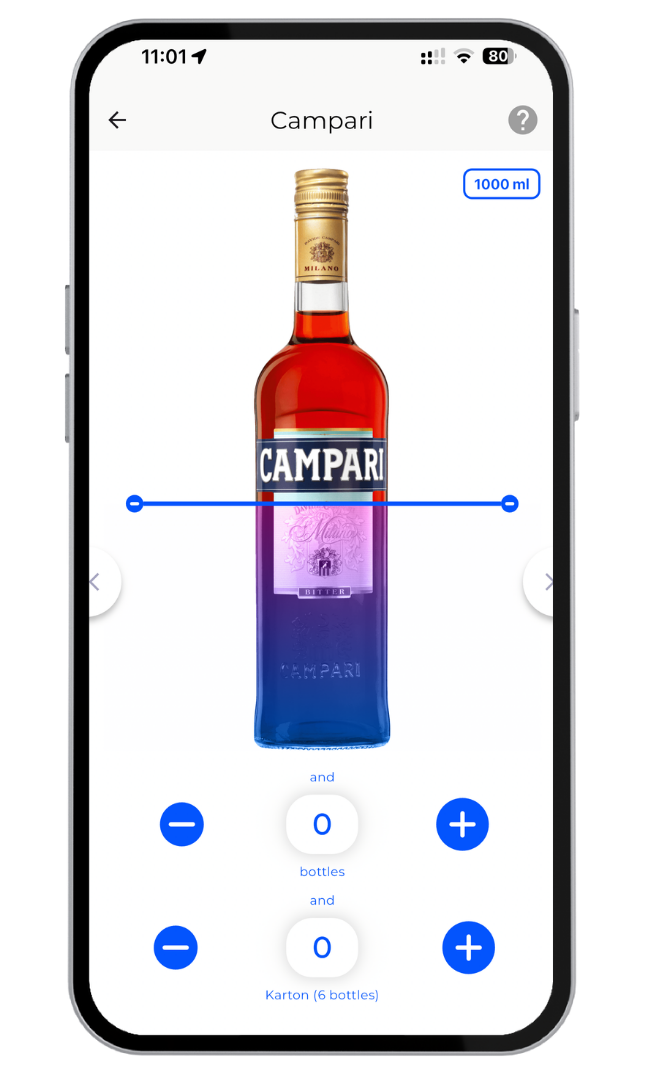
Stocktaking is completed much faster, as it is counted digitally on site. Compared to Excel, BarBrain saves an average of 60% of the time thanks to an intuitive app with sliders etc. No subsequent entry is necessary either - the data including the reports are available immediately - even when counting in parallel as a team.

Counting on paper and later transferring to Excel takes twice as much time. Even with direct entry on a laptop: the inventory takes a long time, people tend to jump between lines or make mistakes and every entry has to be made manually.

Accuracy

BarBrain reduces input and calculation errors by automatically generating all totals. Even partial quantities - such as opened bottles or meals - can be recorded precisely thanks to the integrated slider, instead of just making a rough estimate.

Prone to errors: transposed numbers when typing, formula errors in cells or accidentally overwritten values can distort the result. Partial quantities must be estimated or guessed as decimal values.

Utilization

Specially designed for stocktaking - no knowledge of spreadsheets required. Simple app interface with predefined products; even inexperienced staff can get started immediately.

Requires table know-how: Layout and formulas must first be set up. The user interface is not designed for fast counting (small cells, scrolling). Employees need training to use the file correctly.

Integrations

Product catalog and evaluation are prefabricated, but adapted to catering needs (incl. categories for bar, kitchen, non-food). Updates (new products, units) are carried out by the BarBrain team on request.

Very flexibly customizable, but all manual work: Every new article group or change in the range must be created manually in the Excel file. Risk of version chaos if several people edit the file.

Reports & Analysis

Reports show shrinkage, cost of goods sold and historical trends with just a few clicks. Shopping lists are also created with just one click. No additional effort required for graphics or pivot tables.

Possibilities for analysis available (pivot, diagrams), but everything must be set up by the user.

Devices & Team

Runs on existing smartphones/tablets (iOS, Android). Several people can count simultaneously in a team and the data is synchronized live.

Easiest to run on a laptop. Several people can count at the same time in a team and the data is synchronized live - but then internet must be available everywhere.

Costs

Software license from 52€ per month, but savings due to less working time and more precise stock control are high. Avoiding stock shortages and shrinkage pays off.

Monthly license costs from €7.00. Excel solution is often already available. Hidden costs: high time expenditure for maintaining the file, potential follow-up costs for errors (incorrect orders, undetected shrinkage due to incorrect figures).

Excel turns stocktaking into a DIY project: you can set many things, but you are responsible for every step yourself. BarBrain takes this work off the restaurateur's hands - from data entry to evaluation. The table shows that BarBrain scores particularly highly in terms of user-friendliness and reliability, while Excel does not incur any software costs, but has inherent inefficiencies.

Practical comparison: From Excel chaos to smart stocktaking

Let's take a look at two real-life situations:

  • Inventory with Excel: A restaurant without a special inventory system has developed a comprehensive Excel spreadsheet over the years. This contains several spreadsheets: one for drinks, one for food and one for consumables. On inventory day, the manager prints all the lists from Excel to do the count with his team - nobody wants to take expensive laptops into the damp cellar, and using Excel on a tablet is cumbersome. So everyone writes down their results on paper to transfer them to the file later. After all the figures have been laboriously typed in, the manager realizes that there must be an error somewhere: The totals formula shows a negative stock level. The search begins - perhaps a typing error? After some time, he finds an item that has been entered twice and corrects it. An employee suggests counting directly on the tablet in Excel to save typing. No sooner said than done the next time: however, it turns out that working in parallel is difficult - only one person at a time can use the spreadsheet to avoid conflicts. So it comes down to counting one after the other again instead of in parallel. By the skin of your teeth, you end up with an inventory list. Evaluations beyond this (e.g. shrinkage compared to the target according to sales) are not provided for in the Excel template or are outdated because nobody keeps the complicated formulas up to date. The knowledge gained from the inventory remains low, except for the absolute stock list.

  • Inventory with BarBrain: The introduction of BarBrain in this restaurant shows that it can be done differently. The entire Excel incoming goods catalog was transferred to the app once by the BarBrain team, including all items and units. On the inventory date, the manager and two employees open the BarBrain app on their devices. Everyone selects a storage area (bar, kitchen, storeroom) and starts recording at the same time. No one has to worry about formulas or setting up tables - the app guides them through the process. While the manager scans the liquor shelf and enters the fill levels using the slider, the chef counts the stockroom. The data is collated in real time in an inventory list. When the last compartment has been counted, the manager taps on "Complete inventory". BarBrain immediately generates a comprehensive report: he can now see not only the current stock levels, but also the changes since the last stocktake. The valuation of stock levels is also available at the touch of a button, making the financial accountant's work easier. The manager's conclusion: for him, stocktaking has shrunk from an Excel "monster" to a lean routine. The time required by the team has been noticeably reduced and the figures are reliable.

"The introduction has not only made our stocktaking faster, but also more accurate." In particular, the exact recording of opened bottles, which was always a guess in Excel, has significantly improved his stock control.

Conclusion: Special tool instead of universal tool

Excel is undoubtedly a powerful universal tool - but when it comes to stocktaking, special software such as BarBrain is clearly superior to the spreadsheet program. BarBrain vs. Excel means: automation vs. manual work, user-friendliness vs. susceptibility to errors, immediate results vs. later follow-up.

BarBrain offers restaurateurs, bar owners and hotel managers the opportunity to professionalize the inventory process without having to become an Excel expert themselves. The software is tailored to industry-specific requirements and is continuously updated, whereas an Excel solution often remains piecemeal and depends on the creator. In addition, BarBrain can be used as a team solution, which Excel cannot achieve with the same simplicity.

Of course, BarBrain incurs running costs, while Excel is usually already available. However, experience shows that the investment pays for itself quickly - through saved working time and more precise inventories. Incorrect quantities and the resulting unplanned reorders or loss of sales are minimized. The bottom line is that the advantages of a modern stocktaking app far outweigh the disadvantages.

If you are still using Excel lists for inventory in the catering industry, you should consider making the switch. The days of time-consuming spreadsheets could be over - BarBrain offers a practical alternative that has been specially developed for your day-to-day stocktaking. In today's digital hospitality industry, it makes sense to rely on the right tools: For stocktaking, this is no longer Excel, but a solution like BarBrain that makes your life easier.

Book a demo now!

Do you want to improve your inventory? Then now is the time to book a no-obligation demo.

A line in the background for a call-to-action for the fastest inventory in the food & beverage sector.

Frequently asked questions (FAQ)

How do I get started with BarBrain?

To get started with BarBrain, you can book a demo with us at any time. We will then work with you to find the right setup and go through all the important points with you so that you can carry out your next inventory with BarBrain.

For which companies is BarBrain suitable?

BarBrain is ideal for all hospitality businesses, including bars, restaurants, nightclubs and hotels - regardless of size. It is suitable for both owner-operated individual businesses and large chains with multiple locations.

How many users can use the app at the same time?

BarBrain allows multiple users to work in the app at the same time. You can invite your colleagues to work in parallel on different locations or tasks.

Is there a free trial period?

Yes, BarBrain offers a 30-day free trial period during which you can try out all the app's functions without any restrictions.

How much does it cost to use BarBrain?

The cost of using BarBrain depends on the number of locations and the specific requirements of your business.

Is BarBrain able to manage multiple locations?

Yes, you can manage multiple locations in the app and carry out a separate inventory for each location. This is particularly useful for businesses with several branches or locations.

Is BarBrain available on mobile devices?

Yes, BarBrain is available as an app for both Android and iOS devices. There is also a web app that you can use via your browser.