Kriterium
BarBrain
Hypersoft
Zeit
BarBrain is designed for fast inventory counts and saves up to 60% of the time compared to traditional methods. Mobile on-site data capture and parallel team counting drastically reduce the duration of stocktakes – inventories often take only half as long as before.
Inventory with Hypersoft often requires manual effort and post-processing. Whilst barcode scanners and scales can be connected to speed up counting, the process remains time-consuming without these aids.
Genauigkeit
BarBrain captures stock directly in digital form, reducing human error to a minimum. Automated calculations and precise fill-level measurement (including opened units) lower the error rate to virtually zero. Estimates or transposed numbers are eliminated, resulting in precise and reliable inventory data.
Hypersoft offers an integrated stock management system. With optional inventory equipment (e.g. barcode readers or digital scales), stock can be captured accurately. However, without such tools there is a risk of estimates and transcription errors during manual recording, which can compromise accuracy.
Nutzung
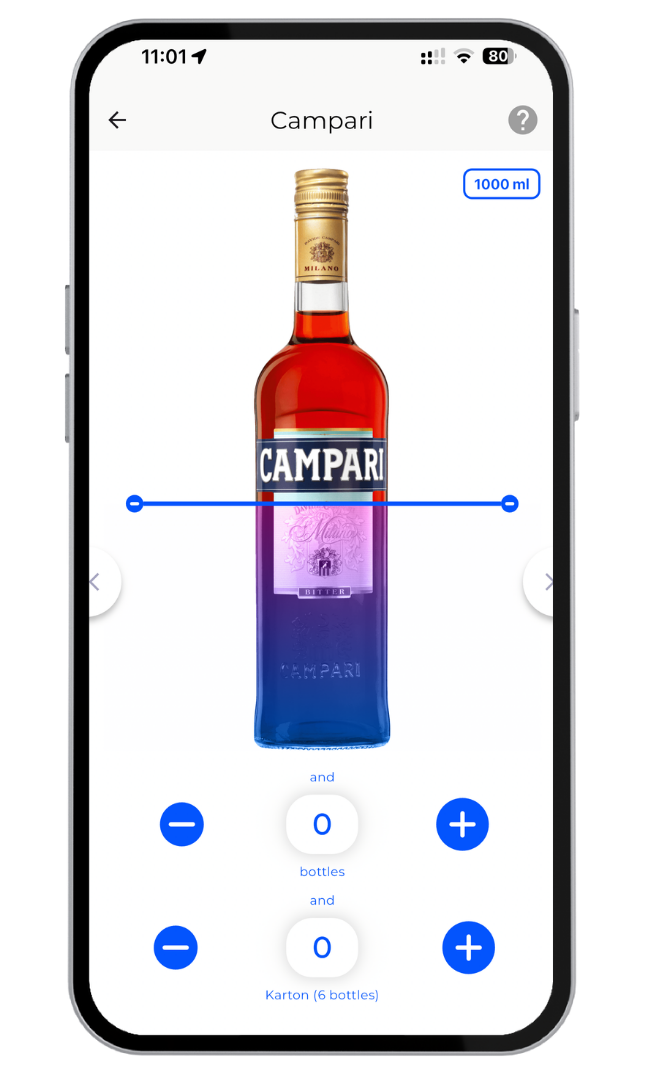
BarBrain was developed as a mobile inventory app for smartphones and tablets, featuring an intuitive user interface. Quantities are captured simply by tapping or swiping – a 1-click count for beverages and food items makes the process exceptionally straightforward. Even opened bottles or partially used food can be recorded precisely via a slider. Double work steps (noting down and later typing in) are completely eliminated, making the application much easier for staff as well.
Hypersoft is a comprehensive POS system whose inventory module must first be configured and learned. Operation primarily takes place on a PC (back office) or via a dedicated handheld device, which requires onboarding and training. Without additional devices, the inventory process is less intuitive – often printouts or lists are used, which then have to be transferred into the system.
Integrationen
BarBrain integrates flexibly into any operation, as it works independently of the POS system. The app comes with an extensive product catalogue of over 20,000 food & beverage items, making integration of new products effortless. Stock data can be further processed via Excel export or API, so inventory results can be seamlessly incorporated into existing workflows (controlling, stock management of other systems).
Hypersoft's inventory is part of a closed all-in-one solution. The software offers numerous interfaces and modules within its own ecosystem (e.g. financial accounting such as DATEV), but no direct connection to external inventory tools – inventory data stays within the Hypersoft back-office environment. On the hardware side, scanners and scales can be integrated, but data exchange with third-party systems is limited.
Berichte & Analyse
BarBrain generates automatic inventory reports immediately after counting. At the press of a button, clear evaluations are available – including totals, variances, stock value, shopping lists and even historical comparisons. Manual recalculations or Excel spreadsheets are no longer needed. The analyses are specifically tailored to inventories, giving hospitality operators an immediate, clear overview of their current stock and shrinkage.
Hypersoft provides extensive reporting functions in the back office. Over 100 predefined reports for finances, personnel and cost of goods are available. Inventory data feeds into this stock management system, enabling features such as purchase order suggestions. However, evaluations typically need to be pulled manually on the PC; specific inventory reports require know-how and time, as inventory is only one part of the overall package.
Geräte & Team
BarBrain can be used on any smartphone or tablet (iOS/Android) – no additional hardware is required. The app allows multiple people to count simultaneously as a team, even in different storage areas in parallel. All entries are synchronised in real time, so there is no waiting for a free device. The result is a relaxed team that finishes together in less time.
Hypersoft relies on dedicated POS hardware and optional inventory equipment. Inventories are typically carried out by individual staff members one after another, as the standard solution does not support multiple people working on the same inventory simultaneously. To count in parallel, multiple devices or additional licences are needed. For small teams, this is often impractical, as staff have to take turns without additional devices.
Kosten
BarBrain offers transparent subscription packages starting from €52 per month for every business size. Even the Basic plan allows small businesses to carry out unlimited inventories. Larger packages scale according to need, up to enterprise solutions – you only pay for what you use. Expensive specialist hardware is completely unnecessary, keeping entry costs low. Thanks to the enormous time savings and error prevention, BarBrain pays for itself quickly, and hospitality operators gain back valuable working hours. Additionally, BarBrain can be tried without obligation (demo and free trial), allowing the added value to be assessed risk-free.
Acquiring Hypersoft involves a larger investment. It is a comprehensive POS software whose pricing model varies depending on the module and business size – prices are usually calculated individually on request. In addition to monthly licence fees (a mobile POS terminal costs approximately €105 per month plus modules), there are costs for POS terminals, scanners and support. For smaller businesses, these ongoing costs can be substantial.